

Is this the first time you have an iPhone in your hands? Congratulations! Beginnings are really exciting, but what comes next? We know that for a new iPhone user, the initial setup of the device can seem problematic. Moreover, in order to use it at its full potential, you need to keep in mind many aspects related to the new operating system, especially when switching from Android to iOS.
Do not worry, it takes time to understand and get used to the differences between operating systems, and to make this process easier, we have prepared a short guide for using your new iPhone, which we hope will be helpful.
Which iOS version or iPhone model should you choose?
As a first-time iPhone user, you will first need to understand the basics of iOS, meaning the operating system. First of all, as you have probably already heard, it is very intuitive and easy to use, with a user-friendly interface and pre-installed apps that help you with your daily activities.
It is worth mentioning that regardless of the model you choose, all iPhones run the same software, although there are small differences in terms of performance. Let us give you an example: if you are looking for an iPhone compatible with 5G, you can choose, for example, the iPhone 12, but if your main concern is having a good smartphone at a decent cost, you can confidently choose an iPhone 8+.
Also, if your budget is not that large, we encourage you to take a look at the iPhone SE, an exceptional model that you can find on our website for only 499 lei and which will provide all the necessary functions for daily use.
Below, we have prepared a list of 10 things every new iPhone user should know when setting up their mobile phone for the first time, so that the experience is exceptional.
Are you a new iPhone user? Here is what you need to know
Refurbished iPhone vs. new iPhone: lower price, same performance
- Create your Apple ID
The first step in using your iPhone is to create an Apple ID account. For this, you can use either an email address such as ion.popescu@icloud.com or any other email address of your choice. Once created, you will be able to use the App Store, the place where you will find the best apps for iPhone. Moreover, you will have pre-installed apps such as iTunes for listening to your favorite music or podcasts. - Sync your iOS devices with iCloud
If you already have an Apple ID, you can sync the data you have on your other Apple devices, such as iPads, MacBooks, or even another iPhone, using iCloud. All the information you have synced will automatically download to your new iPhone as well. Moreover, this feature will allow you to easily share content across the rest of your devices that use iOS. For example, the images on your iPad or the contacts available on your previous iPhone will be accessible again at any time after this synchronization is completed. - Configure your privacy and security settings
You can check which apps use location services and decide whether or not to keep permission for providing this information. Moreover, you can secure your phone by setting up Face ID, a passcode, or fingerprint authentication. Another app often used by users is Find My iPhone, which locates your phone and makes it ring if it is nearby. - Move your data from Android to iOS
In 2015, Apple introduced an Android app called Move to iOS. As the name suggests, the Move to iOS app helps former Android users smoothly transfer their data to an iPhone. This transition is also one of the most important steps for new iPhone users, because it allows them to access their contacts, photos, or calendar on the new phone without worrying about manual transfer or other unfriendly third-party solutions.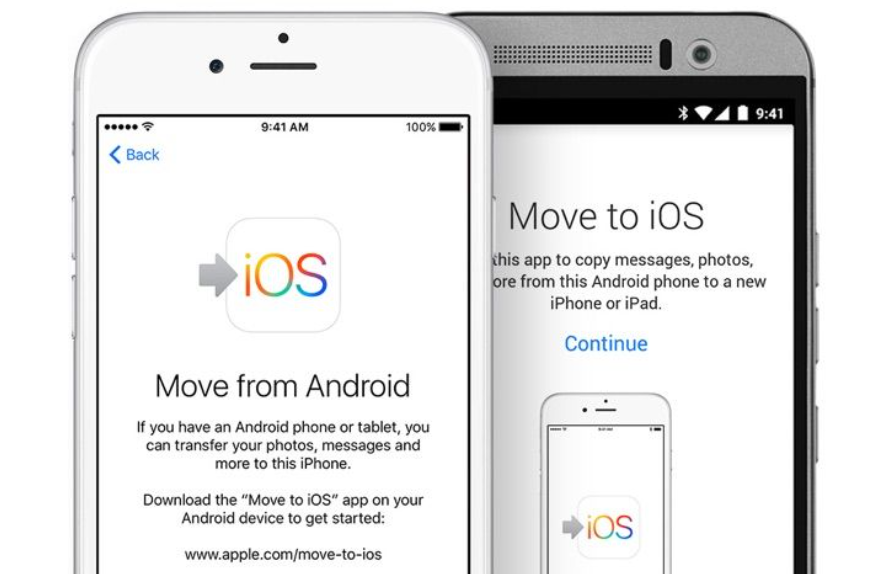
- Discover the secrets of your new iPhone
Apple offers a built-in app called Tips that will help you learn the operating system faster and efficiently guide you through the first moments of using your new iPhone as a beginner. The app shows you how to use the features of your new device and what you should know when using the already pre-installed apps. In addition, with every operating system update, new tips are added, so you always have useful information at hand. - Set up the Control Center
If you swipe from the top toward the bottom of the screen, you will see the Control Center. It provides quick access to some of the most important and useful features of the iPhone, such as screen brightness, Wi-Fi, Bluetooth, Airplane mode, camera, calculator, stopwatch, flashlight, AirDrop, music, and portrait orientation. - Notification Center
Swipe down from the top of the screen to access the Notification Center, where you can see the latest messages, calls, calendar events, and other app notifications. Just like with the Control Center, you can configure this menu from Settings, allowing or denying permission to see different notifications on the screen. - Night Mode ON
You can activate Night Shift to optimize screen brightness so that it emits less blue light. The purpose of this feature is to avoid affecting sleep by causing acute eye fatigue. This filter will allow you to read or watch videos more comfortably in a low-light environment and will help you fall asleep more easily, and even rest better during the night. Similarly, you can access this feature from the Control Center section by swiping up from the bottom of the screen. - Activate Siri
Meet Siri, your iPhone’s voice assistant, which will allow you to use typical iOS features such as making a call, setting alarms, writing notes, opening apps, and much more.
You can activate Siri when setting up your iPhone for the first time, but you can also activate it later by going to Settings > Siri. We should also mention that to give Siri a command, you need to start with “Hey, Siri”. Sounds super cool, doesn’t it? - Use AirDrop
The AirDrop feature makes it easy to share documents, photos, videos, and various files between Apple devices, such as other iPhones, MacBooks, or iPads. Using this feature, any transfer is simple and fast, without the need for a cable connection. You only need to make sure the devices are connected to the same Wi-Fi network.
Apps for any new iPhone user
Apple phones are known for their ease of use and durability, even when referring to seemingly outdated models. As a first-time iPhone user, Apple’s built-in apps add more value to the final experience, such as Maps, Photos, Mail, Safari, or Siri.
Safari has been declared the best browser after Chrome, and the smooth gestures and fast transitions available in a different way compared to the Android version of the same apps save time and effort, making the user experience intuitive and extremely friendly, something anyone can quickly get used to.
With iOS 14, Apple made it easier to customize the way your iPhone looks by offering new widgets and simpler methods for setting custom app icons. For example, by using Widgetsmith, any user can add photos, text, and quotes, thus personalizing their phone according to their own preferences.
In addition, the recent iOS 15 updates focused on updating FaceTime, Push Notifications, Photos, and many other pre-installed apps, managing to maintain the standard users are accustomed to, without leaving out the classic linear design language.
Conclusions
Above, we have seen the benefits of using an iPhone. They are easy to use, have excellent performance, and offer a wide range of features that Android phones, unfortunately, do not have optimized. However, a major concern for many users who avoid trying them is actually the much higher purchase budget.
It is true that iPhones are among the most expensive smartphones. However, if you want such a device, you do not necessarily have to choose the latest model from an official showroom. Moreover, we encourage you to turn your attention to our section of refurbished iPhones, because you will get the same performance at much more affordable prices.
A refurbished device is a pre-loved product, 100% checked and perfectly functional, for which you will receive a 12-month warranty. Still not convinced? We invite you to discover the Klap.ro offer and analyze the variety of iPhone models available in our online store!